How to Identify Malicious Emails and Protect Yourself Online: 9 Proven Strategies Every Business Owner Must Know


How to identify malicious emails and protect yourself online

In today’s digital-first business environment, email is both a powerful communication tool and a major security risk. Cybercriminals increasingly rely on deceptive messages to trick professionals into revealing sensitive data, transferring money, or installing malware. Understanding how to identify malicious emails and protect yourself online is no longer optional—it’s an essential business skill.


Understanding Malicious Emails

Malicious emails are designed to deceive recipients into taking harmful actions. These messages often look legitimate, using familiar logos, professional language, and trusted names.

What Makes an Email Malicious?

A malicious email typically aims to:

  • Steal login credentials
  • Trick you into transferring funds
  • Install harmful software
  • Gain unauthorized access to systems

They often exploit human psychology—fear, urgency, curiosity, or authority.

Why Business Professionals Are Targeted

Business owners manage finances, contracts, and sensitive data. Attackers know that professionals are busy and may act quickly without double-checking details, making them prime targets.


Common Types of Malicious Emails

Phishing Emails
what-is-phishing-1 How to Identify Malicious Emails and Protect Yourself Online: 9 Proven Strategies Every Business Owner Must Know

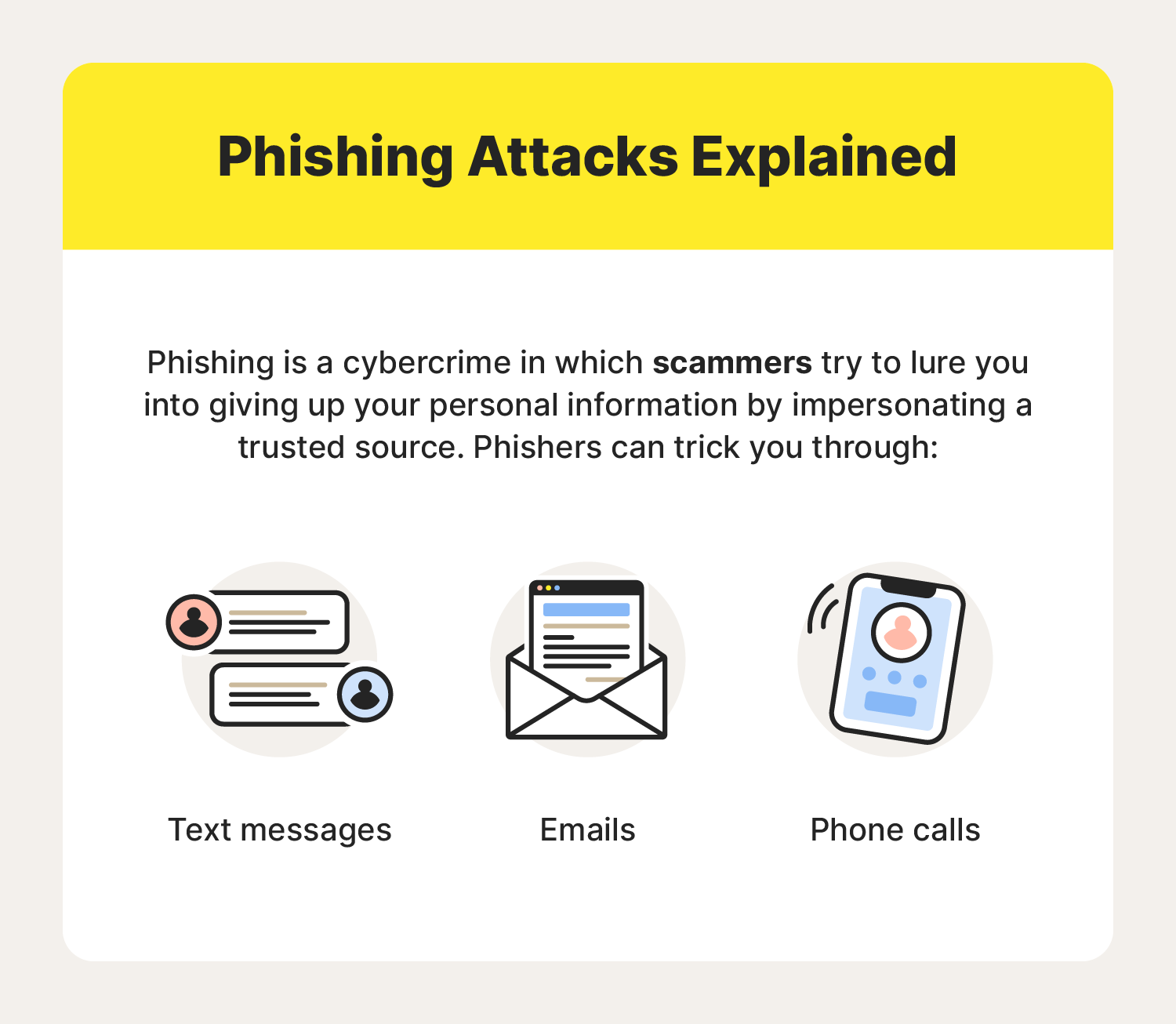
Phishing emails impersonate trusted organizations such as banks, vendors, or cloud service providers. They often ask you to “verify” or “reset” account information via a fake link.

Spear Phishing and Whaling

  • Spear phishing targets a specific individual using personalized information.
  • Whaling targets executives or business owners with high authority, often involving fake invoices or legal notices.

Malware and Attachment-Based Attacks

Attachments disguised as invoices, resumes, or reports may contain malware that installs silently once opened.


Key Warning Signs of Malicious Emails

Suspicious Sender Information

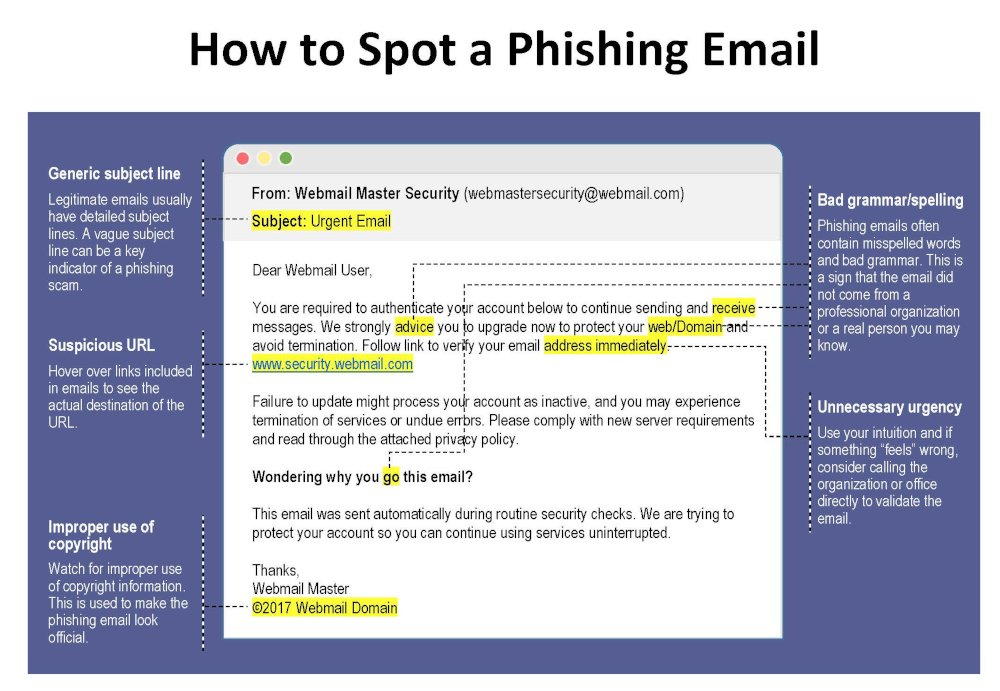
Look closely at the sender’s email address. Attackers often use domains that closely resemble legitimate ones (for example, @paypa1.com instead of @paypal.com).

Urgent or Threatening Language

Messages claiming “your account will be closed today” or “immediate action required” are classic red flags.

Unexpected Links and Attachments

If you weren’t expecting a file or link, don’t click it—especially if the email pressures you to act fast.


How to Identify Malicious Emails and Protect Yourself Online

This is the core skill every professional must master.
how-to-spot-a-phishing-email How to Identify Malicious Emails and Protect Yourself Online: 9 Proven Strategies Every Business Owner Must Know

Verifying Senders and Domains

  • Hover over the sender name to view the real address
  • Compare the domain with previous legitimate emails
  • When in doubt, contact the sender through a known channel

Safely Inspecting Links

Hover over links without clicking. If the URL looks strange, misspelled, or unrelated, it’s likely malicious.

Using Email Security Tools

Modern email platforms offer spam filters, phishing detection, and warning banners. Enable all available security features and consider advanced email security solutions for business accounts.


Best Practices for Online Protection

Strong Password Management

Use long, unique passwords for each account. A reputable password manager helps store and generate secure passwords safely.

Multi-Factor Authentication (MFA)

MFA adds an extra layer of protection by requiring a second verification step, significantly reducing the risk of account compromise.

Regular Software Updates

Outdated software often contains known vulnerabilities. Keeping systems updated closes security gaps attackers exploit.


Email Security for Business Owners

Employee Training and Awareness

Human error is one of the biggest cybersecurity risks. Regular training helps staff recognize threats and respond correctly.

Company Email Policies

Establish clear rules for handling invoices, payment requests, and sensitive data. For example, require verbal confirmation for financial transactions.


What to Do If You Receive a Malicious Email
what-to-do-if-you-get-a-phishing-email How to Identify Malicious Emails and Protect Yourself Online: 9 Proven Strategies Every Business Owner Must Know

Immediate Actions

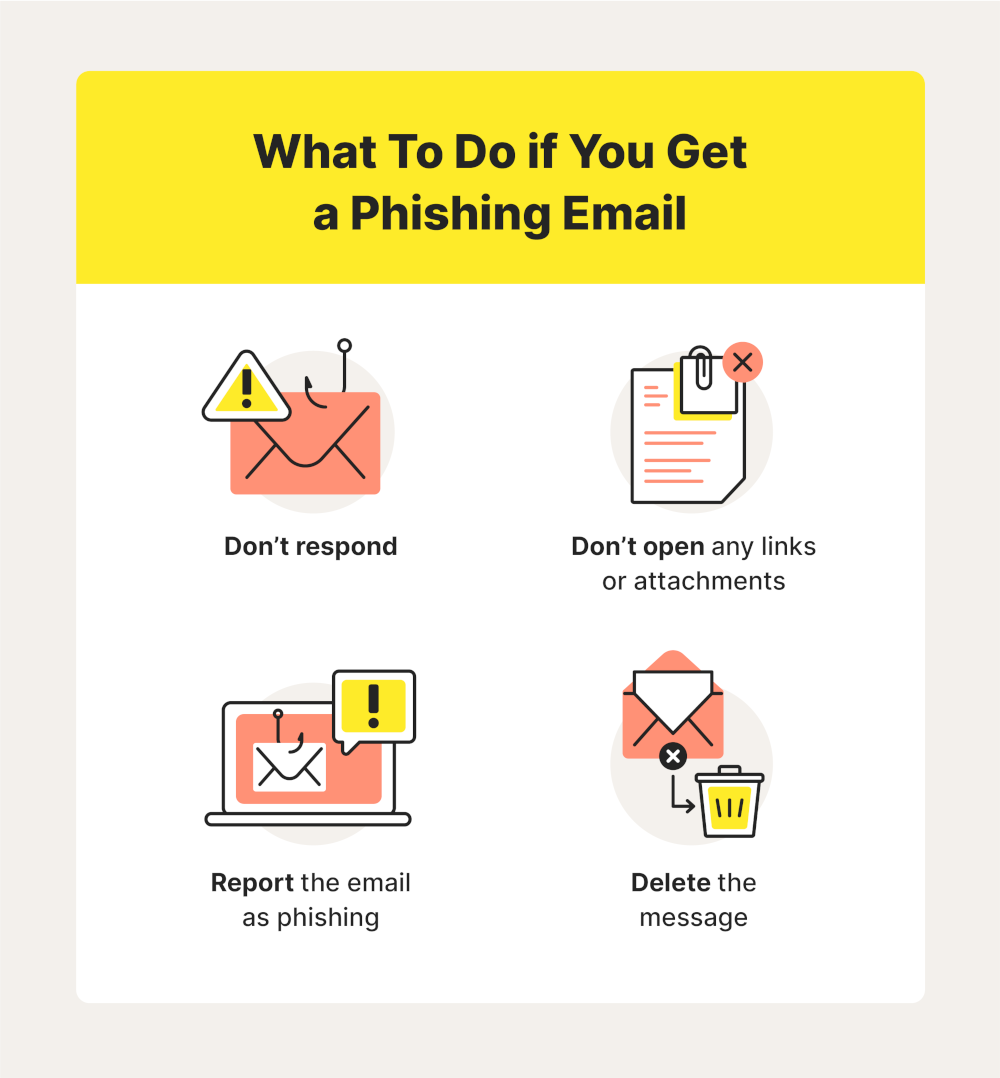
  • Do not click links or open attachments
  • Do not reply to the message
  • Mark the email as spam or phishing

Reporting and Recovery

If you accidentally interacted with a malicious email:

  • Change affected passwords immediately
  • Inform your IT team or service provider
  • Monitor accounts for unusual activity

For authoritative guidance, consult resources from organizations like the U.S. Cybersecurity and Infrastructure Security Agency (CISA) .


Frequently Asked Questions

1. How can I quickly tell if an email is malicious?

Check the sender address, look for urgent language, and avoid clicking unexpected links or attachments.

2. Are malicious emails only a problem for large companies?

No. Small and medium-sized businesses are frequent targets because they often have fewer security controls.

3. Can antivirus software stop malicious emails?

Antivirus helps, but it’s not enough on its own. Awareness and safe habits are equally important.

4. Is it safe to open email attachments from known contacts?

Not always. Known contacts can be compromised. Always verify unexpected attachments.

5. How often should employees receive security training?

At least once or twice a year, with additional updates when new threats emerge.

6. What’s the biggest mistake professionals make with email security?

Acting too quickly without verifying the request.


Conclusion

Learning how to identify malicious emails and protect yourself online is a critical responsibility for modern business owners and professionals. Cyber threats continue to evolve, but so can your defenses. By recognizing warning signs, verifying messages, and adopting strong security practices, you significantly reduce your risk of falling victim to online attacks.

Staying cautious, informed, and proactive is the best long-term strategy for protecting your business and professional reputation.


Contact DuLac Networks to learn more about how to protect your business online.

Macs Under Siege: The Latest Malware Threats in 2025

Threats to Macs are Increasing

While Macs have traditionally been seen as less vulnerable to malware than Windows PCs, the threat landscape is evolving, and macOS is increasingly targeted by sophisticated cybercriminals. 2024 saw a surge in new Mac malware families, and 2025 is already proving to be a challenging year. Let’s delve into some of the most pressing threats facing Mac users today.

XCSSET: A Resurgent Threat

XCSSET, a complex and potentially devastating malware, has resurfaced with a new variant in 2025. This malware, first discovered in 2020, targets developers by infecting their Xcode projects. If a developer’s infected project is then used by other developers, the malware can spread rapidly, potentially leading to a supply chain attack.

The latest XCSSET variant boasts enhanced obfuscation techniques, making it harder to detect. It also employs new persistence mechanisms, ensuring that the malware remains active even after a system restart. XCSSET’s capabilities are extensive, including:

  • Data theft: Stealing information from Safari browsers, Skype, Telegram, WeChat, Notes, and other apps.
  • Website backdoors: Injecting JavaScript backdoors into websites.
  • Screenshots: Taking screenshots of the user’s screen.
  • File encryption: Encrypting files for ransom.

Microsoft has issued warnings about this new XCSSET variant, emphasizing its potential for widespread impact. Developers are urged to exercise caution when downloading Xcode projects and to verify their integrity.

Info Stealers: A Growing Menace

Info stealers are a type of malware designed to steal sensitive information from users’ devices. They have become a significant threat to Mac users in recent years. In 2024, one particular info stealer, Poseidon, accounted for a staggering 70% of all info stealer detections on Macs.

Poseidon targets a wide range of data, including:

  • Cryptocurrency wallets: Stealing cryptocurrency from various wallets.
  • Passwords: Extracting passwords from web browsers and password managers.
  • VPN configurations: Stealing VPN configurations.

Cybercriminals are increasingly using malvertising to distribute info stealers like Poseidon. They create malicious ads that mimic legitimate software or services, tricking users into downloading the malware.

Other Notable Threats

In addition to XCSSET and info stealers, several other malware families are targeting Macs in 2025. These include:

  • FrigidStealer: A new info stealer discovered by Proofpoint, distributed through fake update campaigns.
  • New Mac Malware Families: Security researcher Patrick Wardle identified 22 new macOS malware families in 2024, including stealers, backdoors, downloaders, and ransomware.

Staying Safe

To protect your Mac from these evolving threats, it’s crucial to:

  • Install security software: Use reputable antivirus and anti-malware software that provides real-time protection.
  • Be cautious with downloads: Only download software from trusted sources, such as the Mac App Store or the developer’s official website.
  • Keep your software updated: Regularly update your macOS and applications to patch security vulnerabilities.
  • Be wary of phishing scams: Avoid clicking on suspicious links or opening attachments from unknown senders.
  • Exercise caution with Xcode projects: Developers should carefully inspect and verify any Xcode projects downloaded from repositories.

By staying informed and taking proactive security measures, Mac users can significantly reduce their risk of malware infection in 2025 and beyond.

References:

Cybersecurity for Small Business in 2025

Image of Cybersecurity

Why Cybersecurity is Crucial for Small Businesses

In today’s digital age, no business is immune to the growing threat of cyberattacks. Small businesses, in particular, are prime targets due to often-limited resources and lax security measures. A 2023 report by Verizon (“Verizon Data Breach Investigations Report 2023”) found that 46% of data breaches involved small businesses—a stark reminder that these companies are not too small to be on hackers’ radars. To safeguard your business’s future, it’s essential to implement robust cybersecurity measures. This article explores key areas of vulnerability—email, backups, passwords, and Microsoft 365—and highlights the benefits of hiring a Managed Service Provider (MSP) to handle your cybersecurity needs.


Email: The Frontline of Cyberattacks

Email remains one of the most common entry points for cyber threats. Phishing attacks, which trick users into revealing sensitive information or installing malware, are particularly rampant. According to Cisco’s 2023 Cybersecurity Report (“Cisco Cybersecurity Readiness Index 2023”), 86% of organizations reported at least one user clicking on a phishing link. For small businesses, the financial and reputational fallout from a compromised email system can be catastrophic.

Key Measures to Protect Your Email:

  • Implement advanced spam filters to block malicious emails.
  • Use multi-factor authentication (MFA) for email accounts to add an extra layer of security.
  • Train employees regularly on how to identify and report phishing attempts.

Backups: Your Safety Net

Data loss can occur due to ransomware attacks, hardware failures, or even natural disasters. Without proper backups, your business risks losing critical information, which could halt operations and lead to significant financial losses. Unfortunately, many small businesses overlook this crucial aspect of cybersecurity.

Best Practices for Secure Backups:

  • Use the 3-2-1 rule: maintain three copies of your data, store it on two different types of media, and keep one copy offsite.
  • Ensure backups are encrypted to prevent unauthorized access.
  • Regularly test backup systems to verify data can be restored quickly.

Passwords: Your First Line of Defense

Weak passwords are a leading cause of data breaches. A 2022 report by NordPass (“NordPass Top 200 Most Common Passwords 2022”) revealed that small businesses often use simple, easy-to-guess passwords, making them vulnerable to brute force attacks.

Password Security Tips:

  • Use a password manager to generate and store complex passwords securely.
  • Require employees to update their passwords regularly.
  • Enforce policies such as minimum password length and the use of special characters.
  • Implement multi-factor authentication wherever possible.

Microsoft 365: A Popular Target for Hackers

As a widely used productivity suite, Microsoft 365 is an attractive target for cybercriminals. Its popularity among small businesses means hackers are constantly devising new ways to exploit vulnerabilities in its platform.

How to Secure Microsoft 365:

  • Enable security features like Advanced Threat Protection (ATP) to detect and mitigate risks.
  • Use Conditional Access policies to control who can access your resources and under what conditions.
  • Regularly review and update user permissions to ensure only authorized personnel have access to sensitive data.
  • Conduct regular audits to identify and address security gaps.

Why Hire a Managed Service Provider (MSP)?

Many small businesses lack the in-house expertise or resources to maintain robust cybersecurity measures. A Managed Service Provider (MSP) can bridge this gap, providing expert support and proactive solutions tailored to your needs.

Comprehensive Benefits of Hiring an MSP:

  1. 24/7 Monitoring and Incident Response: MSPs continuously monitor your systems for potential threats, ensuring swift detection and mitigation of risks. This proactive approach helps prevent breaches before they escalate.
  2. Cost-Effective Solutions: Maintaining an in-house IT team can be expensive, especially for small businesses. MSPs provide scalable services at a fraction of the cost, ensuring you only pay for what you need.
  3. Expertise in the Latest Threats and Solutions: Cyber threats evolve rapidly, and staying ahead of them requires specialized knowledge. MSPs are experts in the latest cybersecurity trends, tools, and technologies, giving your business access to industry-best practices.
  4. Customized Security Plans: Every business is unique. MSPs assess your specific needs and vulnerabilities to develop tailored security measures that align with your operations and goals.
  5. Regulatory Compliance Support: Many industries are subject to strict data protection regulations. MSPs help ensure your business complies with legal requirements, avoiding costly fines and reputational damage.
  6. Business Continuity and Disaster Recovery: MSPs implement robust backup and recovery solutions to minimize downtime in the event of a cyberattack or system failure. This ensures your operations can continue with minimal disruption.
  7. Employee Training and Support: Human error is a significant cybersecurity risk. MSPs provide ongoing training to educate employees about best practices, phishing scams, and other potential threats, fostering a culture of security awareness.
  8. Scalability and Flexibility: As your business grows, so do your cybersecurity needs. MSPs offer scalable solutions that adapt to your changing requirements, ensuring consistent protection without the hassle of upgrading in-house systems.

Conclusion

Cybersecurity is no longer a luxury but a necessity for small businesses. By addressing vulnerabilities in email, backups, passwords, and platforms like Microsoft 365, you can significantly reduce the risk of cyberattacks. While implementing these measures might seem daunting, partnering with a Managed Service Provider can simplify the process, providing you with peace of mind and allowing you to focus on growing your business. Don’t wait until it’s too late—invest in cybersecurity today to secure your tomorrow.

DuLac Networks presents Vade for M365

We are proud to now offer Vade for M365 as part of our service stack. Vade for M365 offers advanced protection against dynamic, email-borne cyberattacks targeting Microsoft 365, including phishing, malware/ransomware, and spear phishing (business email compromise). Vade for M365 offers a native Microsoft Outlook user experience and an added layer of protection over Microsoft’s built-in security layers, catching 10x more advanced email threats than Microsoft.

About Vade
• 1 billion mailboxes protected
• 100 billion emails analyzed / day
• 1,400+ partners
• 95% renewal rate
• 15 active international patents

Find out more about how Vade for M365 can help protect your organization.

Vade for M365 Overview

Vade for M365 Data Sheet

Microsoft retiring basic authentication

Beginning on October 1st Microsoft will begin retiring the basic authentication procedure for Exchange Online. This will include anyone using Microsoft 365 for Exchange email. The reason for the change is that Basic Authentication is quickly becoming a target for attackers, and Modern Authentication methods are more secure. Here’s an update from Microsoft regarding this.

To answer some common questions you may have:

  • No. App passwords will no longer work.
  • No, this does not mean MFA must be configured (Although it’s 2022. If you don’t have MFA configured now….)
  • No, Basic authentication won’t be disabled for everyone in one go. It’s a phased thing that lasts October until December. By Jan 1, all tenants are disabled.
  • Yes, if Outlook is currently using Basic Authentication you have configured it yourself using registry keys.
  • Yes, SMTP Auth will also be disabled later on, but only if it’s currently not in use in the tenant. You will have the option to reenable that.

You can read more details about it from Microsoft here.

If you are unsure how this affects your organization then contact us for more information.

hosted-exchange-logo1 Microsoft retiring basic authentication

BlueKeep creates concern for Windows 7 users.

The latest threat to Windows users comes in the form of a vulnerability that allows an attacker to take control of a computer remotely. According to WikiPedia here’s the definition:

BlueKeep (CVE2019-0708) is a security vulnerability that was discovered in Microsoft‘s Remote Desktop Protocol, which allows for the possibility of remote code execution.

The remote code execution is the most concerning since it could potentially allow hackers to install software on the remote system and use tools such as self propagating worms to spread across a network.

All users of Windows 7, Windows Server 2008, and Windows Server 2008 R2 are being strongly urged to install Windows updates from Microsoft to protect against this threat.

Serious flaw in WPA2 protocol affects Android and Linux users

A new vulnerability has been discovered centered around a flaw in the WPA2 protocol that many wireless routers use for security.The proof-of-concept exploit is called KRACK and has been only discovered as a possible way for hackers to steal data over wireless connections. This has not been proven to be useful in a real-world situation but the possibility is present that a hacker could exploit this vulnerability. To protect yourself update the firmware on your wireless router/access point and update the software on your Android smartphones. You can read more about the vulnerability in this article: https://arstechnica.com/information-technology/2017/10/severe-flaw-in-wpa2-protocol-leaves-wi-fi-traffic-open-to-eavesdropping/


Avoid Ransomware attacks

Ransomware has quickly become one of the biggest forms of malware attacks in the world. Many organizations have been affected throughout the world and no one is safe from the possibility of these infections making their way onto your system. Here are a few tips on how to avoid being infected.

Keep Windows updated!

  • There’s nothing more important than to keep Windows updated with the latest patches available for your version. Unless there’s reason not to, you should set Windows Updates to run automatically and set it for a time when you’re not using your computer. The key here is to make sure the system is turned on and not in sleep mode when the updates are set to run.

R_consumer4 Avoid Ransomware attacks

Paid Security Software.

  • There are some free antivirus/antimalware programs available online but the truth is the best ones are the paid versions. In this field you really do get what you pay for and a full Internet Security solution is your best bet. Most packages run $30-$60/year depending on features.

Don’t click that link/open that attachment!

  • Almost all malware infections including Ransomware come through either an infected email attachment, or a hijacked link on a web page.
  • Don’t open an attachment in an email if you were not expecting it or do not know the sender.
  • Beware of emails or websites that could contain hijacked links.
    • Before clicking any link in an email or on a web page hover over the link with your mouse. The actual web page the link points to will appear in the bottom left-hand portion of your web browser. If the link looks suspicious at all do not click on it.

These are just a few things that can be done to protect against Ransomware and other forms of malware infections. Contact us now to find out how our custom security solutions are designed to protect your systems and data from Ransomware attacks.