How to Identify Malicious Emails and Protect Yourself Online: 9 Proven Strategies Every Business Owner Must Know


How to identify malicious emails and protect yourself online

In today’s digital-first business environment, email is both a powerful communication tool and a major security risk. Cybercriminals increasingly rely on deceptive messages to trick professionals into revealing sensitive data, transferring money, or installing malware. Understanding how to identify malicious emails and protect yourself online is no longer optional—it’s an essential business skill.


Understanding Malicious Emails

Malicious emails are designed to deceive recipients into taking harmful actions. These messages often look legitimate, using familiar logos, professional language, and trusted names.

What Makes an Email Malicious?

A malicious email typically aims to:

  • Steal login credentials
  • Trick you into transferring funds
  • Install harmful software
  • Gain unauthorized access to systems

They often exploit human psychology—fear, urgency, curiosity, or authority.

Why Business Professionals Are Targeted

Business owners manage finances, contracts, and sensitive data. Attackers know that professionals are busy and may act quickly without double-checking details, making them prime targets.


Common Types of Malicious Emails

Phishing Emails
what-is-phishing-1 How to Identify Malicious Emails and Protect Yourself Online: 9 Proven Strategies Every Business Owner Must Know

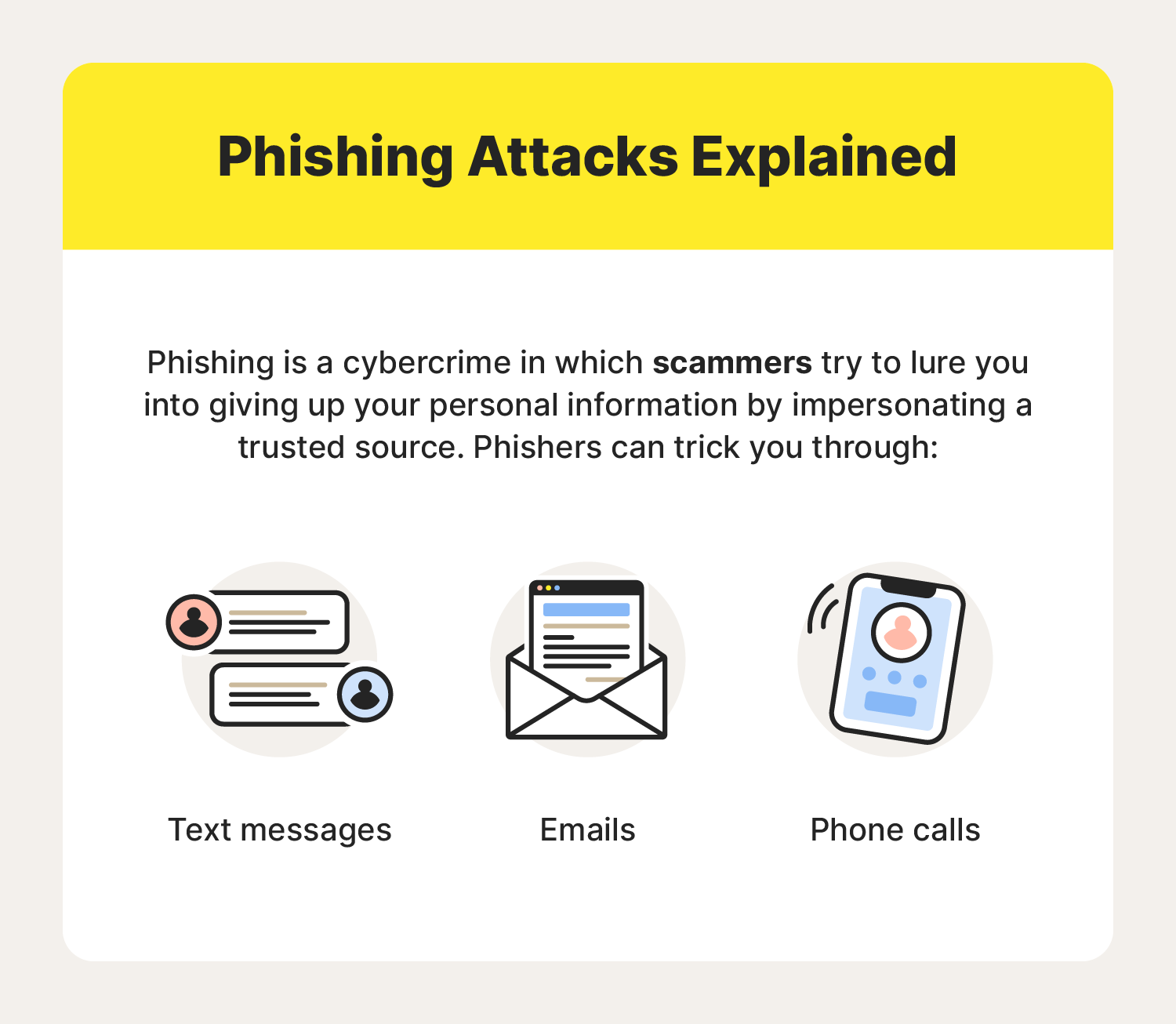
Phishing emails impersonate trusted organizations such as banks, vendors, or cloud service providers. They often ask you to “verify” or “reset” account information via a fake link.

Spear Phishing and Whaling

  • Spear phishing targets a specific individual using personalized information.
  • Whaling targets executives or business owners with high authority, often involving fake invoices or legal notices.

Malware and Attachment-Based Attacks

Attachments disguised as invoices, resumes, or reports may contain malware that installs silently once opened.


Key Warning Signs of Malicious Emails

Suspicious Sender Information

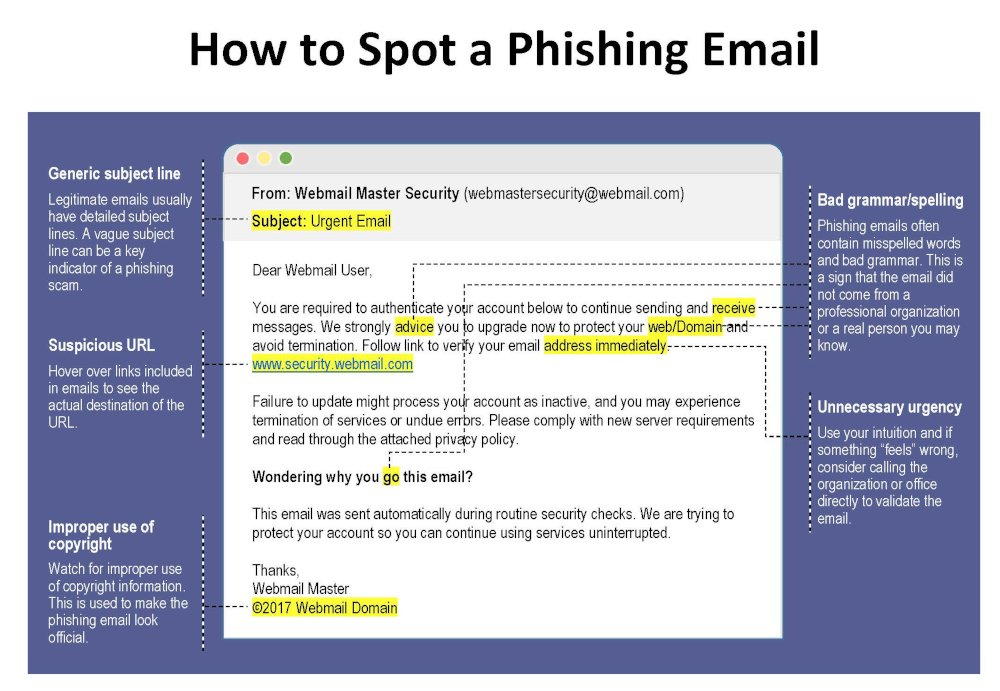
Look closely at the sender’s email address. Attackers often use domains that closely resemble legitimate ones (for example, @paypa1.com instead of @paypal.com).

Urgent or Threatening Language

Messages claiming “your account will be closed today” or “immediate action required” are classic red flags.

Unexpected Links and Attachments

If you weren’t expecting a file or link, don’t click it—especially if the email pressures you to act fast.


How to Identify Malicious Emails and Protect Yourself Online

This is the core skill every professional must master.
how-to-spot-a-phishing-email How to Identify Malicious Emails and Protect Yourself Online: 9 Proven Strategies Every Business Owner Must Know

Verifying Senders and Domains

  • Hover over the sender name to view the real address
  • Compare the domain with previous legitimate emails
  • When in doubt, contact the sender through a known channel

Safely Inspecting Links

Hover over links without clicking. If the URL looks strange, misspelled, or unrelated, it’s likely malicious.

Using Email Security Tools

Modern email platforms offer spam filters, phishing detection, and warning banners. Enable all available security features and consider advanced email security solutions for business accounts.


Best Practices for Online Protection

Strong Password Management

Use long, unique passwords for each account. A reputable password manager helps store and generate secure passwords safely.

Multi-Factor Authentication (MFA)

MFA adds an extra layer of protection by requiring a second verification step, significantly reducing the risk of account compromise.

Regular Software Updates

Outdated software often contains known vulnerabilities. Keeping systems updated closes security gaps attackers exploit.


Email Security for Business Owners

Employee Training and Awareness

Human error is one of the biggest cybersecurity risks. Regular training helps staff recognize threats and respond correctly.

Company Email Policies

Establish clear rules for handling invoices, payment requests, and sensitive data. For example, require verbal confirmation for financial transactions.


What to Do If You Receive a Malicious Email
what-to-do-if-you-get-a-phishing-email How to Identify Malicious Emails and Protect Yourself Online: 9 Proven Strategies Every Business Owner Must Know

Immediate Actions

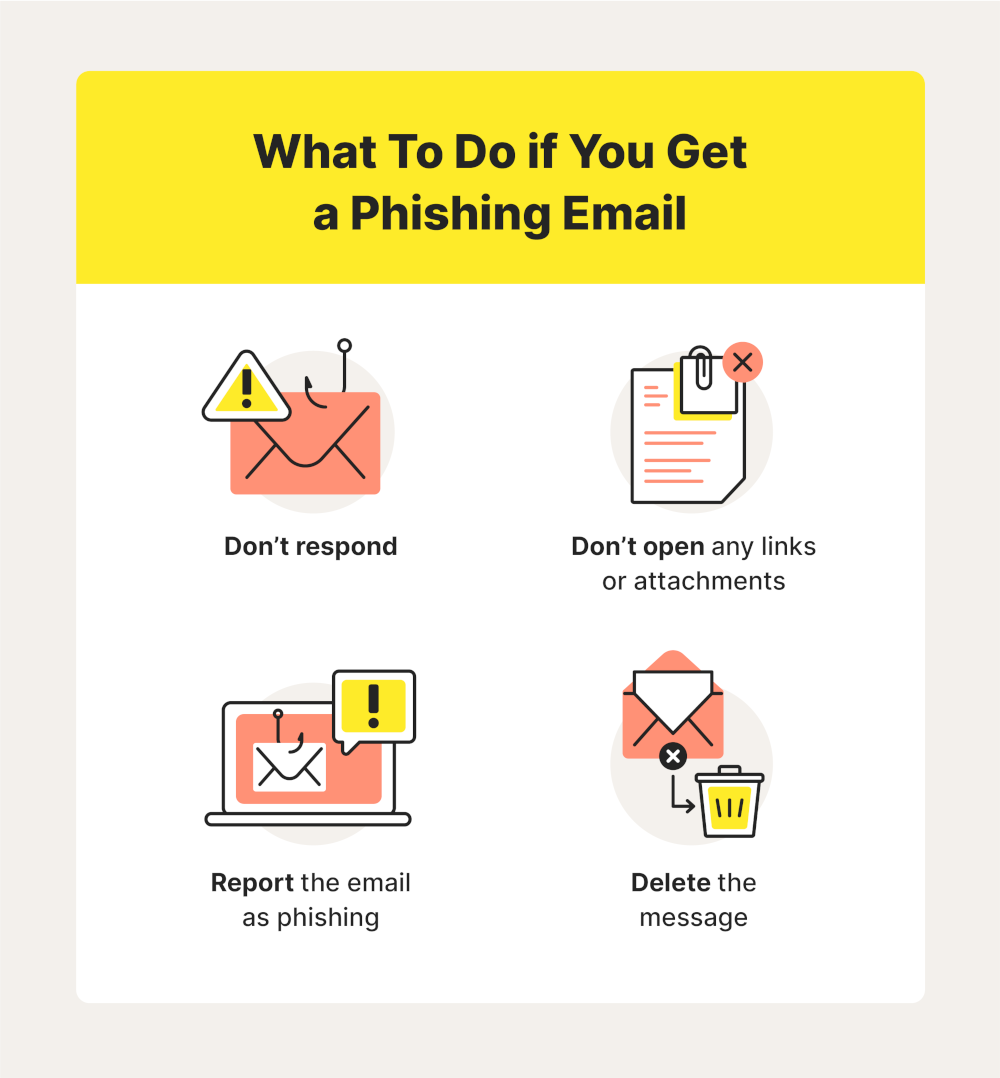
  • Do not click links or open attachments
  • Do not reply to the message
  • Mark the email as spam or phishing

Reporting and Recovery

If you accidentally interacted with a malicious email:

  • Change affected passwords immediately
  • Inform your IT team or service provider
  • Monitor accounts for unusual activity

For authoritative guidance, consult resources from organizations like the U.S. Cybersecurity and Infrastructure Security Agency (CISA) .


Frequently Asked Questions

1. How can I quickly tell if an email is malicious?

Check the sender address, look for urgent language, and avoid clicking unexpected links or attachments.

2. Are malicious emails only a problem for large companies?

No. Small and medium-sized businesses are frequent targets because they often have fewer security controls.

3. Can antivirus software stop malicious emails?

Antivirus helps, but it’s not enough on its own. Awareness and safe habits are equally important.

4. Is it safe to open email attachments from known contacts?

Not always. Known contacts can be compromised. Always verify unexpected attachments.

5. How often should employees receive security training?

At least once or twice a year, with additional updates when new threats emerge.

6. What’s the biggest mistake professionals make with email security?

Acting too quickly without verifying the request.


Conclusion

Learning how to identify malicious emails and protect yourself online is a critical responsibility for modern business owners and professionals. Cyber threats continue to evolve, but so can your defenses. By recognizing warning signs, verifying messages, and adopting strong security practices, you significantly reduce your risk of falling victim to online attacks.

Staying cautious, informed, and proactive is the best long-term strategy for protecting your business and professional reputation.


Contact DuLac Networks to learn more about how to protect your business online.
Why Your Company Needs a Business Continuity/Disaster Recovery Plan

Telehouse-blog-9.14.17-ThinkstockPhotos-493868680_0-1024x614 Why Your Company Needs a Business Continuity/Disaster Recovery Plan

Meta Description:
Discover why your company needs a business continuity/disaster recovery plan to prevent massive losses, protect your data, and ensure long-term success. Don’t wait until it’s too late.


Understanding Business Continuity and Disaster Recovery

What is Business Continuity?

Business continuity (BC) is the strategic process a company uses to ensure that it can maintain or quickly resume its essential functions during and after a major disruption. This includes natural disasters, cyberattacks, power outages, or even a sudden loss of key personnel.

At its core, business continuity planning ensures that your operations don’t grind to a halt in a crisis. It covers things like:

  • Critical business functions and workflows
  • Communication plans
  • Employee coordination
  • Customer service and support continuity

By investing in BC, companies create a proactive shield against chaos—ensuring the ability to bounce back, or better yet, keep moving.

What is Disaster Recovery?

Disaster recovery (DR) is a subset of business continuity that focuses specifically on IT systems and data. Its main goal is to restore lost data and recover disrupted technology infrastructure after a catastrophic event.

Think of it like this: business continuity keeps the business running, and disaster recovery gets your digital assets back in order.

Key DR elements include:

  • Cloud-based data backups
  • Off-site recovery centers
  • Server replication
  • Recovery protocols and playbooks

Key Differences Between BC and DR

While these two strategies work hand-in-hand, they’re not identical. Here’s a quick comparison:

AspectBusiness ContinuityDisaster Recovery
ScopeEntire organizationIT and data systems
ObjectiveMaintain operationsRecover data and systems
FocusPeople, processes, facilitiesTechnology, data, networks
TimelineImmediate response & ongoing operationsPost-event data/system restoration

Common Threats That Disrupt Business Operations

Natural Disasters and Climate Change

Earthquakes, floods, hurricanes, and wildfires don’t just damage property—they can halt production, destroy supply chains, and isolate employees. As climate change increases the frequency of these events, every company is now at risk.

Cybersecurity Threats

Ransomware attacks, data breaches, and malware are becoming more common and more devastating. Without a DR plan, a single cyberattack could lock you out of your own systems or leak sensitive customer data, leading to loss of trust and regulatory fines.

Human Error and System Failures

Even your most diligent employees can make mistakes. A simple misconfiguration or accidental data deletion can spiral into a major outage. Pair this with aging infrastructure or failed hardware, and you’ve got a recipe for disaster.

Pandemics and Global Health Crises

The COVID-19 pandemic showed us how fragile global business operations really are. Office closures, travel restrictions, and health concerns can bring even the biggest corporations to a grinding halt—unless a continuity plan is in place.


The High Cost of Unpreparedness

Financial Impact of Downtime

According to Gartner, the average cost of IT downtime is $5,600 per minute. That’s over $300,000 per hour—a price tag most companies can’t afford. From missed sales to recovery costs, the financial blow is often devastating.

Reputational Damage

Customers expect reliability. If your business can’t deliver services or safeguard data during a crisis, trust is lost. This can lead to bad reviews, media scrutiny, and a long road to recovery.

Legal and Regulatory Consequences

Failing to comply with industry standards or legal requirements—like GDPR in Europe or HIPAA in the U.S.—can result in hefty fines and lawsuits. Regulators expect companies to have continuity and disaster recovery plans in place.


Core Benefits of a Continuity/Recovery Plan

Minimizing Downtime and Data Loss

One of the most immediate advantages of having a business continuity/disaster recovery plan is the ability to drastically reduce downtime. Even a few hours of operational halt can lead to major revenue losses. With backup systems, redundant hardware, and cloud-based recovery solutions, you can restore operations within minutes or hours, rather than days or weeks.

Additionally, your data remains protected. Whether stored in secure off-site facilities or replicated in real-time to the cloud, critical business information can be recovered quickly and securely—protecting against both human error and cyberattacks.

Enhanced Customer Confidence

A well-structured BC/DR plan doesn’t just help internally; it builds external trust too. Clients and customers feel more confident doing business with companies that can guarantee service continuity—even under pressure. This can be a major competitive edge, especially in industries like finance, healthcare, and e-commerce.

You can also use SLAs (Service Level Agreements) to offer assurances to your customers, showing your commitment to reliability even during disruptions.

Operational Resilience and Agility

In a fast-changing world, businesses need to pivot quickly. Whether you’re shifting to remote work, adapting to supply chain changes, or scaling operations, a continuity plan gives your team the framework and tools to respond with agility.

This resilience leads to long-term sustainability. Rather than scrambling to recover, your business adapts, survives, and even thrives in the face of adversity.


Key Components of an Effective BC/DR Plan

Risk Assessment and Business Impact Analysis (BIA)

Start with a clear understanding of what could go wrong. Risk assessment identifies potential threats—from cyberattacks to power failures—while Business Impact Analysis measures the effect of these disruptions on your operations.

This insight allows you to prioritize which systems, departments, or processes need the most robust protections.

Recovery Time Objectives (RTO) & Recovery Point Objectives (RPO)

These two metrics are essential:

  • RTO (Recovery Time Objective): How quickly you need to recover a system after a disruption.
  • RPO (Recovery Point Objective): How much data you can afford to lose, measured in time (e.g., 15 minutes, 4 hours).

Knowing your RTO and RPO helps you decide on the appropriate backup and recovery solutions.

Backup and Redundancy Strategies

Your BC/DR plan must include detailed backup procedures:

  • On-site backups for fast local recovery
  • Cloud backups for off-site protection
  • Redundant servers to take over in case of hardware failure
  • Network redundancy to maintain connectivity

These strategies ensure no single point of failure can bring your company down.

Crisis Communication Plans

Effective communication during a crisis is essential. Your plan should define:

  • Who communicates with whom
  • How updates are delivered (email, SMS, emergency apps)
  • What messages should be sent internally vs. externally

Clarity and transparency during a crisis help maintain trust and reduce confusion.

This builds muscle memory and reveals weaknesses in the plan.

Monitoring and Regular Updates

The business world evolves fast, and your BC/DR plan must keep up. Regularly review and update the plan to reflect:

  • New threats (e.g., new ransomware tactics)
  • Operational changes (e.g., new facilities or software)
  • Lessons from real-world disruptions

Set a review schedule (e.g., quarterly or bi-annually) and assign ownership to ensure accountability.


Industry-Specific Case Studies

Lessons from Tech Companies

In 2021, a major cloud service provider suffered a multi-hour outage that took down thousands of websites. Those with strong BC/DR plans were able to fail over to other providers or activate static versions of their websites, while others lost millions in revenue.

Healthcare and Finance Sector Insights

Healthcare providers are prime ransomware targets. Those with encrypted cloud backups and clear disaster protocols were able to resume care within hours, while others experienced prolonged outages, putting lives at risk and attracting regulatory scrutiny.

Financial institutions face strict uptime expectations. A minor outage can shake investor confidence. This sector is known for rigorous BC/DR systems, often including geographically dispersed data centers and real-time failovers.


Conclusion: Your Company’s Survival Depends on Planning

Disasters don’t announce themselves. Whether it’s a cyberattack, natural calamity, or internal system failure, the impact can be devastating without preparation.

A robust business continuity and disaster recovery plan isn’t optional anymore—it’s essential. It safeguards your finances, data, reputation, and most importantly, your people.

By proactively investing in BC/DR today, you’re not just protecting your company—you’re ensuring its future resilience, trust, and growth.

Macs Under Siege: The Latest Malware Threats in 2025

Threats to Macs are Increasing

While Macs have traditionally been seen as less vulnerable to malware than Windows PCs, the threat landscape is evolving, and macOS is increasingly targeted by sophisticated cybercriminals. 2024 saw a surge in new Mac malware families, and 2025 is already proving to be a challenging year. Let’s delve into some of the most pressing threats facing Mac users today.

XCSSET: A Resurgent Threat

XCSSET, a complex and potentially devastating malware, has resurfaced with a new variant in 2025. This malware, first discovered in 2020, targets developers by infecting their Xcode projects. If a developer’s infected project is then used by other developers, the malware can spread rapidly, potentially leading to a supply chain attack.

The latest XCSSET variant boasts enhanced obfuscation techniques, making it harder to detect. It also employs new persistence mechanisms, ensuring that the malware remains active even after a system restart. XCSSET’s capabilities are extensive, including:

  • Data theft: Stealing information from Safari browsers, Skype, Telegram, WeChat, Notes, and other apps.
  • Website backdoors: Injecting JavaScript backdoors into websites.
  • Screenshots: Taking screenshots of the user’s screen.
  • File encryption: Encrypting files for ransom.

Microsoft has issued warnings about this new XCSSET variant, emphasizing its potential for widespread impact. Developers are urged to exercise caution when downloading Xcode projects and to verify their integrity.

Info Stealers: A Growing Menace

Info stealers are a type of malware designed to steal sensitive information from users’ devices. They have become a significant threat to Mac users in recent years. In 2024, one particular info stealer, Poseidon, accounted for a staggering 70% of all info stealer detections on Macs.

Poseidon targets a wide range of data, including:

  • Cryptocurrency wallets: Stealing cryptocurrency from various wallets.
  • Passwords: Extracting passwords from web browsers and password managers.
  • VPN configurations: Stealing VPN configurations.

Cybercriminals are increasingly using malvertising to distribute info stealers like Poseidon. They create malicious ads that mimic legitimate software or services, tricking users into downloading the malware.

Other Notable Threats

In addition to XCSSET and info stealers, several other malware families are targeting Macs in 2025. These include:

  • FrigidStealer: A new info stealer discovered by Proofpoint, distributed through fake update campaigns.
  • New Mac Malware Families: Security researcher Patrick Wardle identified 22 new macOS malware families in 2024, including stealers, backdoors, downloaders, and ransomware.

Staying Safe

To protect your Mac from these evolving threats, it’s crucial to:

  • Install security software: Use reputable antivirus and anti-malware software that provides real-time protection.
  • Be cautious with downloads: Only download software from trusted sources, such as the Mac App Store or the developer’s official website.
  • Keep your software updated: Regularly update your macOS and applications to patch security vulnerabilities.
  • Be wary of phishing scams: Avoid clicking on suspicious links or opening attachments from unknown senders.
  • Exercise caution with Xcode projects: Developers should carefully inspect and verify any Xcode projects downloaded from repositories.

By staying informed and taking proactive security measures, Mac users can significantly reduce their risk of malware infection in 2025 and beyond.

References:

AI Automation and Small Businesses in 2025

The Impact of AI and Automation on Small Businesses in 2025

The rapid advancements in artificial intelligence (AI) and automation are transforming industries globally, with small businesses being no exception. By 2025, these technologies are expected to redefine how businesses operate, enhancing efficiency, reducing costs, and driving innovation. However, this wave of technological disruption also brings challenges that small businesses must navigate to remain competitive. Here’s a closer look at how AI and automation will affect industries like healthcare, manufacturing, and construction, along with the implications for small businesses.


AI in Healthcare: Opportunities and Challenges

In healthcare, AI and automation are revolutionizing patient care, diagnostics, and administrative processes. Small businesses in this sector, such as clinics and medical startups, can leverage AI to:

  • Enhance Diagnostics: AI-powered tools, like those developed by Google Health, are enabling faster and more accurate diagnoses of diseases such as cancer and heart conditions.
  • Streamline Operations: Automation tools can manage appointment scheduling, billing, and patient records, reducing administrative overhead.
  • Improve Patient Outcomes: Personalized treatment plans driven by AI analysis of patient data are becoming more accessible, even to smaller providers.

However, the adoption of these technologies requires investment in infrastructure and training, which can be a hurdle for smaller players.


Automation in Manufacturing: A Competitive Edge

Manufacturing is one of the industries most significantly impacted by automation. Small manufacturers can benefit from automation in several ways:

  • Increased Efficiency: Automated systems like robotic arms and AI-driven production lines reduce errors and accelerate production. Companies like Universal Robots are making robotics accessible to smaller businesses.
  • Cost Savings: By automating repetitive tasks, businesses can lower labor costs and redirect resources to innovation.
  • Improved Supply Chain Management: AI tools analyze market trends and optimize inventory, helping small businesses stay competitive.

However, the initial cost of implementing these technologies can be daunting. Small manufacturers must carefully assess the return on investment and seek grants or subsidies where available.


AI in Construction: Building Smarter

The construction industry is also seeing significant advancements through AI and automation. Small businesses in this sector can leverage these technologies to:

  • Enhance Project Management: AI-powered platforms like Procore improve project planning and coordination, reducing delays and cost overruns.
  • Improve Safety: Automation in tasks like excavation and demolition reduces the risk of workplace accidents.
  • Optimize Design: Generative design tools use AI to create efficient and sustainable building plans, enabling small firms to compete with larger players.

Despite these benefits, small construction businesses may face challenges in adopting these technologies due to limited budgets and resistance to change within the workforce.


Overcoming Barriers to Adoption

While AI and automation offer significant benefits, small businesses must overcome certain challenges to harness their potential fully:

  1. Cost of Implementation: Investing in AI tools and automation systems can be expensive. Small businesses should explore affordable solutions and government incentives.
  2. Skills Gap: Employees may need training to work effectively with these technologies. Partnering with training providers can help bridge this gap.
  3. Cybersecurity Risks: As businesses become more reliant on technology, the risk of cyberattacks increases. Implementing robust cybersecurity measures is essential.

Looking Ahead: Preparing for the Future

By 2025, the integration of AI and automation will no longer be optional for small businesses—it will be a necessity to stay competitive. Here’s how small businesses can prepare:

  • Start Small: Begin by automating simple, repetitive tasks and gradually expand the scope.
  • Leverage Cloud Solutions: Cloud-based AI tools, such as those offered by Microsoft Azure and AWS, provide scalable options for small businesses.
  • Collaborate: Partner with tech providers and other small businesses to share resources and expertise.
  • Stay Informed: Keep up with the latest developments in AI and automation to identify opportunities and mitigate risks.

Conclusion

AI and automation are set to reshape the landscape for small businesses in 2025, offering both opportunities and challenges. By embracing these technologies, small businesses in industries like healthcare, manufacturing, and construction can unlock new levels of efficiency and innovation. However, navigating this transformation requires careful planning, investment, and a commitment to continuous learning. With the right approach, small businesses can thrive in the age of AI and automation.

Cybersecurity for Small Business in 2025

Image of Cybersecurity

Why Cybersecurity is Crucial for Small Businesses

In today’s digital age, no business is immune to the growing threat of cyberattacks. Small businesses, in particular, are prime targets due to often-limited resources and lax security measures. A 2023 report by Verizon (“Verizon Data Breach Investigations Report 2023”) found that 46% of data breaches involved small businesses—a stark reminder that these companies are not too small to be on hackers’ radars. To safeguard your business’s future, it’s essential to implement robust cybersecurity measures. This article explores key areas of vulnerability—email, backups, passwords, and Microsoft 365—and highlights the benefits of hiring a Managed Service Provider (MSP) to handle your cybersecurity needs.


Email: The Frontline of Cyberattacks

Email remains one of the most common entry points for cyber threats. Phishing attacks, which trick users into revealing sensitive information or installing malware, are particularly rampant. According to Cisco’s 2023 Cybersecurity Report (“Cisco Cybersecurity Readiness Index 2023”), 86% of organizations reported at least one user clicking on a phishing link. For small businesses, the financial and reputational fallout from a compromised email system can be catastrophic.

Key Measures to Protect Your Email:

  • Implement advanced spam filters to block malicious emails.
  • Use multi-factor authentication (MFA) for email accounts to add an extra layer of security.
  • Train employees regularly on how to identify and report phishing attempts.

Backups: Your Safety Net

Data loss can occur due to ransomware attacks, hardware failures, or even natural disasters. Without proper backups, your business risks losing critical information, which could halt operations and lead to significant financial losses. Unfortunately, many small businesses overlook this crucial aspect of cybersecurity.

Best Practices for Secure Backups:

  • Use the 3-2-1 rule: maintain three copies of your data, store it on two different types of media, and keep one copy offsite.
  • Ensure backups are encrypted to prevent unauthorized access.
  • Regularly test backup systems to verify data can be restored quickly.

Passwords: Your First Line of Defense

Weak passwords are a leading cause of data breaches. A 2022 report by NordPass (“NordPass Top 200 Most Common Passwords 2022”) revealed that small businesses often use simple, easy-to-guess passwords, making them vulnerable to brute force attacks.

Password Security Tips:

  • Use a password manager to generate and store complex passwords securely.
  • Require employees to update their passwords regularly.
  • Enforce policies such as minimum password length and the use of special characters.
  • Implement multi-factor authentication wherever possible.

Microsoft 365: A Popular Target for Hackers

As a widely used productivity suite, Microsoft 365 is an attractive target for cybercriminals. Its popularity among small businesses means hackers are constantly devising new ways to exploit vulnerabilities in its platform.

How to Secure Microsoft 365:

  • Enable security features like Advanced Threat Protection (ATP) to detect and mitigate risks.
  • Use Conditional Access policies to control who can access your resources and under what conditions.
  • Regularly review and update user permissions to ensure only authorized personnel have access to sensitive data.
  • Conduct regular audits to identify and address security gaps.

Why Hire a Managed Service Provider (MSP)?

Many small businesses lack the in-house expertise or resources to maintain robust cybersecurity measures. A Managed Service Provider (MSP) can bridge this gap, providing expert support and proactive solutions tailored to your needs.

Comprehensive Benefits of Hiring an MSP:

  1. 24/7 Monitoring and Incident Response: MSPs continuously monitor your systems for potential threats, ensuring swift detection and mitigation of risks. This proactive approach helps prevent breaches before they escalate.
  2. Cost-Effective Solutions: Maintaining an in-house IT team can be expensive, especially for small businesses. MSPs provide scalable services at a fraction of the cost, ensuring you only pay for what you need.
  3. Expertise in the Latest Threats and Solutions: Cyber threats evolve rapidly, and staying ahead of them requires specialized knowledge. MSPs are experts in the latest cybersecurity trends, tools, and technologies, giving your business access to industry-best practices.
  4. Customized Security Plans: Every business is unique. MSPs assess your specific needs and vulnerabilities to develop tailored security measures that align with your operations and goals.
  5. Regulatory Compliance Support: Many industries are subject to strict data protection regulations. MSPs help ensure your business complies with legal requirements, avoiding costly fines and reputational damage.
  6. Business Continuity and Disaster Recovery: MSPs implement robust backup and recovery solutions to minimize downtime in the event of a cyberattack or system failure. This ensures your operations can continue with minimal disruption.
  7. Employee Training and Support: Human error is a significant cybersecurity risk. MSPs provide ongoing training to educate employees about best practices, phishing scams, and other potential threats, fostering a culture of security awareness.
  8. Scalability and Flexibility: As your business grows, so do your cybersecurity needs. MSPs offer scalable solutions that adapt to your changing requirements, ensuring consistent protection without the hassle of upgrading in-house systems.

Conclusion

Cybersecurity is no longer a luxury but a necessity for small businesses. By addressing vulnerabilities in email, backups, passwords, and platforms like Microsoft 365, you can significantly reduce the risk of cyberattacks. While implementing these measures might seem daunting, partnering with a Managed Service Provider can simplify the process, providing you with peace of mind and allowing you to focus on growing your business. Don’t wait until it’s too late—invest in cybersecurity today to secure your tomorrow.

DuLac Networks presents Vade for M365

We are proud to now offer Vade for M365 as part of our service stack. Vade for M365 offers advanced protection against dynamic, email-borne cyberattacks targeting Microsoft 365, including phishing, malware/ransomware, and spear phishing (business email compromise). Vade for M365 offers a native Microsoft Outlook user experience and an added layer of protection over Microsoft’s built-in security layers, catching 10x more advanced email threats than Microsoft.

About Vade
• 1 billion mailboxes protected
• 100 billion emails analyzed / day
• 1,400+ partners
• 95% renewal rate
• 15 active international patents

Find out more about how Vade for M365 can help protect your organization.

Vade for M365 Overview

Vade for M365 Data Sheet

Microsoft retiring basic authentication

Beginning on October 1st Microsoft will begin retiring the basic authentication procedure for Exchange Online. This will include anyone using Microsoft 365 for Exchange email. The reason for the change is that Basic Authentication is quickly becoming a target for attackers, and Modern Authentication methods are more secure. Here’s an update from Microsoft regarding this.

To answer some common questions you may have:

  • No. App passwords will no longer work.
  • No, this does not mean MFA must be configured (Although it’s 2022. If you don’t have MFA configured now….)
  • No, Basic authentication won’t be disabled for everyone in one go. It’s a phased thing that lasts October until December. By Jan 1, all tenants are disabled.
  • Yes, if Outlook is currently using Basic Authentication you have configured it yourself using registry keys.
  • Yes, SMTP Auth will also be disabled later on, but only if it’s currently not in use in the tenant. You will have the option to reenable that.

You can read more details about it from Microsoft here.

If you are unsure how this affects your organization then contact us for more information.

hosted-exchange-logo1 Microsoft retiring basic authentication

Seasons Greetings

2019 was a good year and as a result we are looking forward to 2020.

With Christmas around the corner and New Year’s right after it’s easy to forget about taking care of your computers and technology. That’s why DuLac Networks takes pride in continuing to provide top quality maintenance and support for all your technology needs.

We offer the following services:

download Seasons Greetings

From all of us at DuLac Networks to all of you. Have a happy and blessed holiday season.